






A new feature in Microsoft Dynamics 365 Finance has just been released that will FINALLY help us avoid using the Customer payment journal deposit slip checkbox but still summarize the entire payment journal directly into the bank subledger.
Feature name: Ability to post detailed vendor and customer payments, but summarize amounts to bank account
Description: Enabling this feature will allow an organization to post vendor and customer payments in separate vouchers but update the bank account in summary. New options are added to the journal name setup, allowing the flexibility to post payments in detail to the bank account for some journals but in summary for different journals. Payments included in the summarized amount posted to the bank account must exist in the same journal and have the same bank account, currency, and transaction date.
What the Dynamics 365 Summarize Payments Feature Provides
When this feature is enabled, it adds the following:
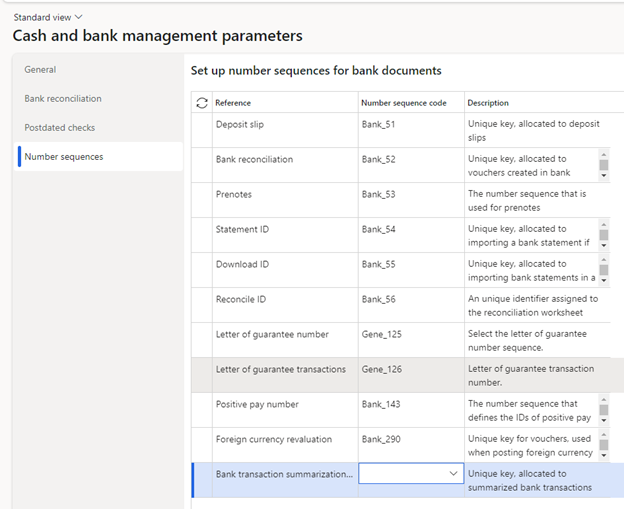
- Cash and bank parameters – New number sequence. This gives a “transaction id” to each summarized amount in the bank subledger.
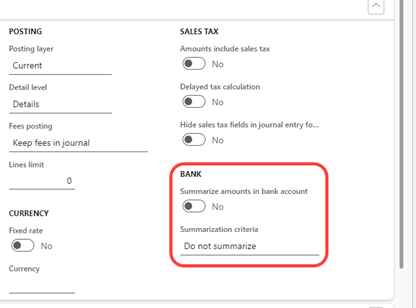
- Journal name setup – Bank summarization settings for the journal.
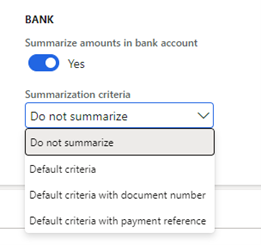
When set to Yes, you can then select how the journal transactions are summarized (whether in total or summarized by Document or Payment reference).
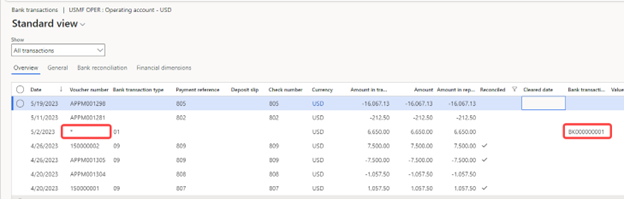
- When you process and post your customer payment journal, it summarizes the total in the bank subledger. There is no required deposit slip step or remembering to check the deposit slip checkbox. Sweet success!
- The bank transaction looks like the other transactions, has the new bank transaction summarization ID, and shows an asterisk for the voucher number since there are several voucher numbers in the underlying journal.
This new feature is available for both customer and vendor payment transactions, but it seems to be more relevant for Customer payments from my perspective.
Have any questions about how to summarize payments in the Dynamics 365 Finance bank account or anything else regarding Dynamics 365 Finance? Please feel free to reach out to one of our experts at any time!
This publication contains general information only and Sikich is not, by means of this publication, rendering accounting, business, financial, investment, legal, tax, or any other professional advice or services. This publication is not a substitute for such professional advice or services, nor should you use it as a basis for any decision, action or omission that may affect you or your business. Before making any decision, taking any action or omitting an action that may affect you or your business, you should consult a qualified professional advisor. In addition, this publication may contain certain content generated by an artificial intelligence (AI) language model. You acknowledge that Sikich shall not be responsible for any loss sustained by you or any person who relies on this publication.